Talk is cheap. Show me the code.— Linus Torvalds
Code is cheap.
Show me the prompt.
A contribution graph for your Claude Code and Codex tokens. See your usage. Find your rhythm. Put it in your README.
npx tokengazer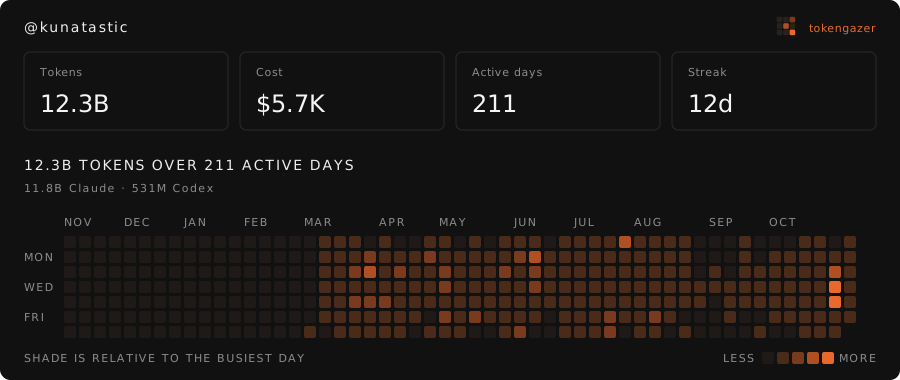
From terminal to timeline.
No SDK. No code changes. Just the session logs your tools already create.
- 01 / INSPECT
Meet your token footprint.
Read your local Claude Code and Codex logs. See your stats before uploading anything.
npx tokengazer - 02 / CONNECT
Make it yours.
Sign in with GitHub to publish your card. An hourly job keeps your numbers fresh.
npx tokengazer login - 03 / SHARE
Show your side of the work.
Copy your Markdown snippet into a README, portfolio, or anywhere you tell your story.
[](…/you)
Your agent can handle the setup.
One prompt. Your existing coding agent. You're connected.
Node.js 20+ · macOS & Linux · No global install needed
Your work stays yours.
Share your activity without sharing what you're working on.
What gets published
- Day, tool, and model
- Input, output, cache, and reasoning token totals
- Whether a day's usage was estimated
What stays on your machine
- Your prompts and AI responses
- Code, file paths, and project names
- Your original session logs
GitHub device sign-in asks for no scopes. Your GitHub token is used once to identify you, then discarded.
A few things to know.
Where do the numbers come from?
Token counts come from Claude Code logs in ~/.claude/projects/ and Codex logs in ~/.codex/sessions/. TokenGazer reads them locally and groups totals by day and model.
Why are some days estimated?
Claude Code deletes session logs after 30 days. Older days are estimated from prompt history and your median tokens per prompt. To retain exact history, set "cleanupPeriodDays": 3650 in ~/.claude/settings.json.
Is the cost what I actually paid?
Cost is the API list-price equivalent of your tokens, not your subscription spend or an invoice.
How do I disconnect or delete my data?
npx tokengazer logout removes hourly sync and your local key. Add --delete to also erase your published data from the server.
Can I build my own view?
Yes. /<github-username>.json returns daily usage rows with CORS enabled. The project is open source under the MIT license.
Find a developer.
Already connected? Your public profile is one GitHub username away.
Or explore a live profile ↗